How to run a creative workshop based on Family of Man
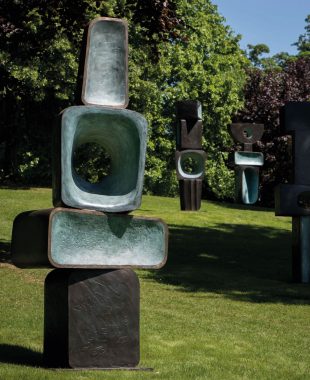
Artwork by Barbara Hepworth, created in 1970
About this activity
Workshop themes
- Family
- Shape
Suitability
- Suitable for groups
- Suitable for one to one
Difficulty level
Hard
Skip to section
Introductions
Materials
- Name badges (for all participants and staff).
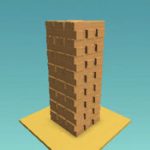
- Jenga pieces (regular or large).
Method
- Go around the room and make eye contact with everyone, shake their hand and say hello.
- Have a game of Jenga (regular or using the larger bricks). Explore themes related to balance and the overall visual effect of the shapes that interact.
- Ask people what they think of the shape and what it looks like.
- Use the bricks in various ways to explore shape and its construction.
- You could take photographs of these sculptures and they could be the inspiration for another upcoming creative session.
TimeSlips™
Materials
- Flipchat and pen
- An image of the artwork (can be viewed in the app or printed from this link )
Method
- Look at the artwork using the Armchair Gallery app.
- Welcome and invite the person or group to create with you and write their answers on the flip chart. Ask open-ended questions (like in the list to the right).
- Affirm/echo all their answers - together we build a story that can have sound, movement, words - even drawings.
- Retell the story, then invite them to add another creative element like sound, or movement.
Suggested Questions
- What’s going on in the picture?
- What shapes can you see?
- What colours can you see?
- What size do you think they are?
- What do you think they are made of?
- Why do you think they are all on top of each other?
- Why do you think they are presented in this way?
- Where would you put these to present them?
- What do you think this piece is called?
- Why do you think the artist made these sculptures?
Play this video
Workshop members can watch this on their own tablet, or you can play it to the group by connecting your tablet to a TV or projector. It can also be downloaded from the Armchair Gallery website.
Interact with the artwork
At this point in the workshop participants should have a go at using the app to interact with the artwork. From the main menu, enter Yorkshire Sculpture Park, select Family of Man and tap Interact and play.
Multi-Sensory Exploration, Part 1
Materials
- iPad or laptop and speakers.
- Paper.
- Felt tip pens.
- Fruit.
- Vegetable peelers.
- Cocktail sticks.
- Fresh grass cuttings.
Sound
You could play Sister Sledge’s we are family themed piece of music.
we are family themed piece of music.
Multi-Sensory Exploration, Part 2
Taste
- Hand around a piece of fruit i.e. an apple and vegetable peelers. Ask the group to peel off various shapes in the fruit and then attach them all together using a cocktail stick.
- This will inspire conversations about negative and positive space whilst connecting the sculpture to the outdoors and nature.
Touch
- Pass around some objects, which have holes in and ask your group to touch and explore them.
Multi-Sensory Exploration, Part 3
Sight
- Give each person a piece of paper and some felt tip pens. Ask them to draw out a shape (any shape that they would like).
- Once their shapes are drawn, ask them to cut them out.
- Place all of the shapes together in the centre of the room (so everyone can see) and create a contemporary drawing using everyone’s shapes.
- You could take inspiration from the shapes found in Hepworth’s sculptures and artworks.
Smell
- Inspired by the green landscape in which the sculptures stand, hand around some fresh grass cuttings for your group to smell.
Making: Polystyrene Sculptures
This activity is inspired by the wonderful sculptures of Barbara Hepworth. Using polystyrene shapes, participants can stretch their imagination and create their own designs and contemporary masterpieces. This task could be done by individuals or in pairs.
Materials
- Polystyrene shapes (an assortment to include balls, tubes, cones and angular shapes).
- Wooden shapes.
- Cocktail sticks.
- Kebab sticks.
- Spray paint (metallic, stone, silver and brick colours).
- Glue gun and glue sticks.
Method
- Using an assortment of polystyrene shapes and/or wooden shapes, begin connecting these together in a design chosen by the participant. Cocktail/kebab sticks can be used to connect the polystyrene shapes to hold them together. Use a glue gun if you need them to be more secure or if you are using wood.
- Continue adding to the sculpture until participants are happy with their design.
- Cut off any sticks that may be sticking out from the sculpture.
- For the final step use the spray paints to finish off the work. Cover the entire surface in the metallic or stone effect spray paint. This will make your sculpture look like it is made from stone, brass or marble.
- For an additional task, use the app Do Ink Green Screen (iPad based app only) to explore how the sculptures would look like next to other sculptures at Yorkshire Sculpture Park
- The final sculptures could be displayed in the garden or an outdoor space. If they have been sprayed with spray paint, they will be waterproof and can resist wet weather conditions.
How to use the Do Ink app
This App is an iPad based app and won’t work on other tablet devices. You will need the App and a piece of Green Fabric to act as the Green Screen for this to work effectively. Green Screen by Do Ink makes it easy to create incredible green screen videos and images right on your iPad or iPhone. The app lets you combine photos and videos from the camera roll with live images from your iPad or iPhone’s camera. * Create sculptures inspired by Barbara Hepworth’s ‘The Family of a Man’ and then use this app to add them to Yorkshire Sculpture Park without having to leave your chair!
Instructions
- Download the Do Ink – Green Screen App onto your iPad
- When you have downloaded the App and open it – you will see it will take you through the App, tagging where the specific buttons are. This is very useful to watch.
- To create your own project – tap on the + on the top right of the screen and tap on ‘create a new project’ – your timeline will then appear at the bottom of the screen ready for you to edit and personalise
- Tap on the bottom + on your timeline- then tap on ‘Image’ or ‘Video’ – select the one you want to use then tap on ‘use’ top right hand corner of the image or video
- Tap on the middle + on your timeline – then tap on ‘Camera’. If your camera comes on and is using your front camera, turn this around using the camera selection tool (top right hand corner of the screen)
- When you put your iPad up to a Green area you will then see the image/video you selected. You can change the colouring slightly by tapping on the colour wheel (bottom right hand corner) and moving the spot to the correct shade of green.
- You can then take either photos/videos of your group in front of the Green Screen by clicking the red button on the screen (*make sure you select whether you are opting for video or image first)
Celebration
Conclude the creative session by handing around the sculptures so that people end up with someone else’s. Ask each member of the group to name their sculpture. Go round and ask everyone to share his or her names. Note these down for future creative session starters.
Finish by thanking everyone for attending and with a round of applause.
Finally…
Getting Materials
You should be able to get most of the materials mentioned in this guide at your local arts supplier.
They are also avaiable on Amazon. If you shop via Amazon Smile (using the button below - UK only), then we will recieve a donation that we can put towards our work with older people.
Other Apps
You could use these other apps to further explore digital technology in your workshop.